Running coding agents without burning down your machine
We tried every isolation approach to run background agents so you don’t have to.
I used to think I liked living on the edge. Switching Cursor to YOLO mode was one of the first things I'd do on any new project. But when I tried Claude Code's --dangerously-skip-permissions and saw the all-caps red "WARNING," I hit ctrl+c fast, twice. I recalled hearing colleagues talk about Claude deleting their files permanently, plus some horror stories on Reddit.
There's a big productivity gain when you let your coding agent skip permissions. You can plan a feature, walk away, and come back to a working first iteration. But that freedom comes with risks: your agent does a web search, catches a prompt injection, and suddenly it's leaking local files or installing scripts that run silently on your machine.
We wanted Claude Code to run free without constant interruptions, but with guardrails that keep your machine intact.
The local sandbox problem
Anthropic built its own open source sandbox for Claude Code, using bubblewrap on Linux and Seatbelt on macOS. These tools restrict what the agent can access at the OS level, and they start fast with minimal overhead.
But "sandboxed" doesn't mean "safe." The agent still runs on your machine with network access, so things can go wrong really fast. Local sandboxes also assume you're sitting there watching. They're built for interactive development, not for kicking off a task and checking the PR in the morning.
What we tried
We tested every isolation approach we could find:
| Approach | Isolation | Cold Start | Persistence | Cost |
|---|---|---|---|---|
| Simulated (just-bash) | Application | Under 1ms | None | Free |
| Containers (Docker/gVisor) | OS-level | 500ms | Optional | $0.02-0.05/hr (self-hosted) |
| Ephemeral VMs (E2B, Modal) | Hardware | 125ms | Session-scoped | $0.10-0.15/hr |
| Durable VMs (Fly Sprites) | Hardware | 1-2s create, instant wake | Persistent | $0.10-0.15/hr (auto-sleeps) |
Simulated environments
These don't run a real operating system. Your agent thinks it's executing shell commands, but everything happens in memory, in JavaScript or WebAssembly. Vercel's just-bash is the clearest example: a TypeScript implementation of bash with a virtual filesystem.
They start instantly, you don't need to set up infrastructure, and they work in the browser. But you can't run real binaries (no ffmpeg, no numpy, no native packages). Good for prototypes, not for production.
Containers
Containers share the host machine's OS but isolate the application layer. Docker is the standard, and you can add stronger isolation with gVisor, which intercepts operations before they reach the host. Claude's web interface uses this approach.
You get a large ecosystem, familiar tooling, and cold starts around 500ms with pre-built images. But containers share the host's core system, so escapes are rare but documented. This works for cloud workloads where you control the infrastructure, though it's not a hard isolation boundary.
Virtual machines
VMs give each agent its own computer: separate OS, separate memory, hardware-enforced boundaries. Nothing shared with the host except physical hardware.
Ephemeral VMs from E2B and Modal use Firecracker, the same technology behind AWS Lambda. They boot in 125ms, give you real OS behavior, and offer the strongest isolation. They're more operationally complex and pricier ($0.10-0.15/hr managed, versus $0.02-0.05/hr self-hosted on EC2). Most providers offer auto-sleep to cut costs when idle.
Durable VMs like Fly Sprites take the opposite approach. Instead of spin up, work, destroy, these are persistent Linux VMs that sleep when idle and wake instantly. Ephemeral sandboxes force agents to rebuild node_modules and reinstall packages on every run. With a durable VM, your agent writes a file today and reads it next week. You're responsible for cleanup, and these aren't built for horizontal scaling, but for long-running work they make life easier.
Network isolation matters as much as filesystem isolation
Every implementation we looked at landed on the same insight: you need network control.
Disabling network entirely is too restrictive. Agents need pip install, npm install, git clone. But open network access is dangerous because agents could send your data anywhere. The answer is a proxy with an allowlist. Traffic routes through a gateway that only permits approved domains like pypi.org, github.com, and npmjs.org.
This pattern shows up in Anthropic's web sandbox, Claude Code's local sandbox, and every managed service we tested. If you're building agent infrastructure, start here.
How Runtime works
One of our main use cases is letting non-engineers contribute to existing repos. Runtime spins up coding sessions without anyone touching their local machines.
Each session runs in an isolated sandbox with Claude Code, a live preview, and the ability to import GitHub repos, create PRs, and deploy. The environment has everything a developer would have (package managers, build tools, databases) but it's not on your laptop and can't touch your files.
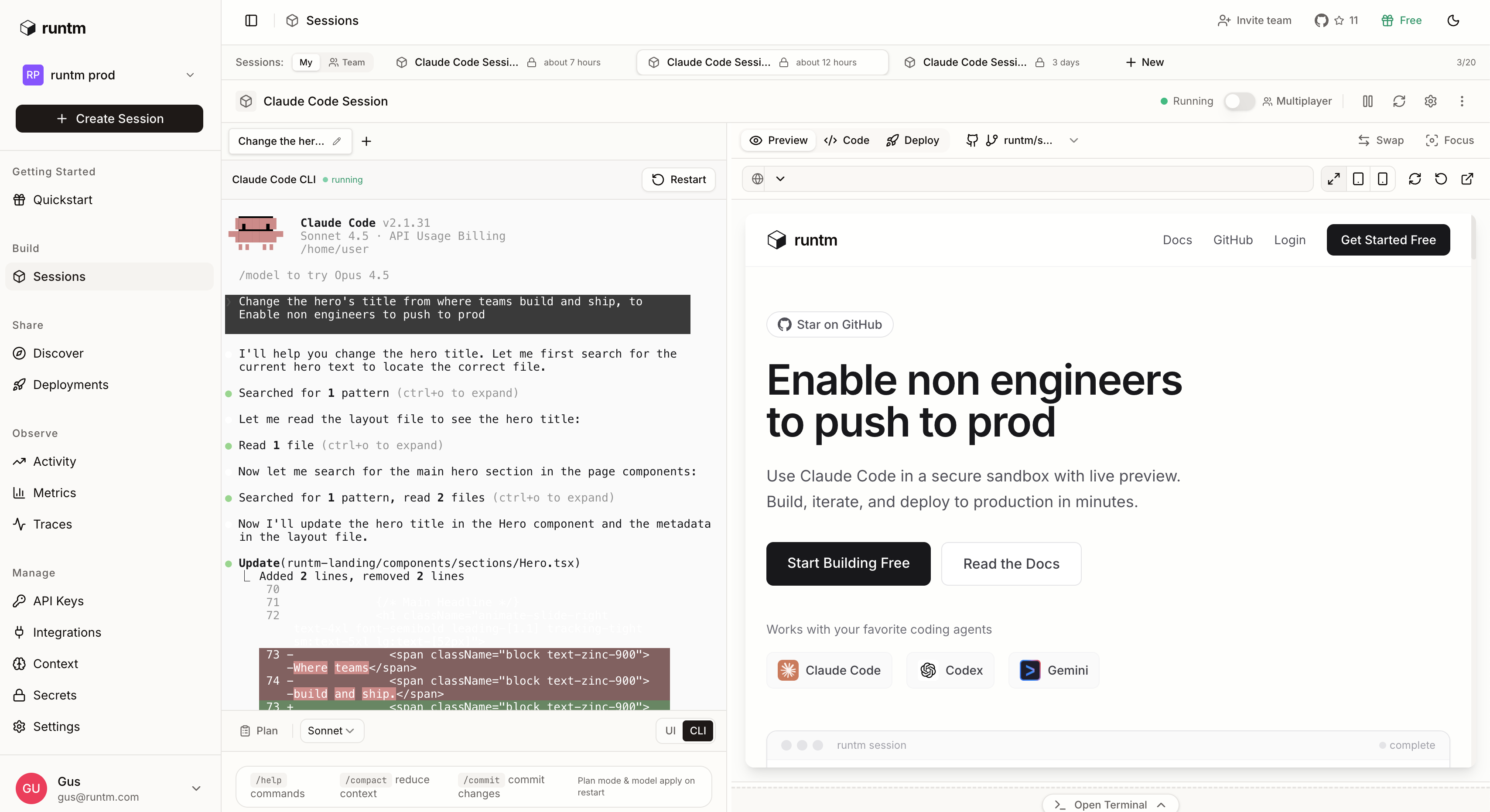
Cold starts run around 500ms for large monorepos with pre-built images. We handle spinning up environments, managing secrets, routing network traffic through controlled proxies, and snapshotting state so you can pick up later.
For engineering leaders, this means more people in your org can ship code with the guardrails and visibility you'd expect. Users describe what they want, watch it happen, and ship.
What's next
This post covered how to run coding agents safely. Getting isolation right is the first step.
Next: once you have a sandboxed coding agent, how do you spin up environments with all the tools and dependencies large repos need pre-installed so they just work?
Ready to run coding agents safely?
Stop worrying about what AI agents might do to your machine. Runtime gives you isolated sandboxes with full development environments.
Get Started Free